
Download vEye HD APK – video management software, DVR, NVR, IP camera, live view, remote playback, file backup, surveillance software, Android app
Overview
vEye HD is a free Android application designed for managing video feeds from a range of connected surveillance devices, including DVRs, NVRs, and IP cameras. Developed by QUVII, the software serves as a centralized platform for monitoring, recording, and retrieving video data. Its primary purpose is to simplify remote surveillance tasks for users who require continuous oversight of security systems. The application is particularly suited for residential, small business, and field-based monitoring scenarios where real-time visibility and data accessibility are essential.
By enabling live view functionality, vEye HD allows users to stream video footage directly from their connected devices, ensuring immediate awareness of on-site activity. The software also supports video recording, which captures footage for later review, and remote playback, facilitating access to recorded content from any location with internet connectivity. Additionally, the file backup feature provides a mechanism for safeguarding critical video data, reducing the risk of loss due to system failures or storage limitations. These capabilities make vEye HD a practical tool for users managing distributed or mobile surveillance setups.
The developer did not provide additional details about QUVII’s background or experience in the security software domain. However, the app’s straightforward functionality suggests a focus on usability and reliability. While no specific user demographics were mentioned, the app appears tailored for individuals and small organizations seeking an accessible solution for monitoring connected video devices without the need for complex installations or hardware dependencies.
Key Features & Capabilities
- Real-Time Live View: Stream video from connected DVRs, NVRs, and IP cameras directly to the Android device, enabling instant visual monitoring of monitored areas.
- Video Recording: Capture and store video footage locally or on connected storage, allowing users to retain evidence or review events after they occur.
- Remote Search and Playback: Access and search through recorded video files from any location, with the ability to play back specific segments based on date, time, or camera channel.
- File Backup: Export recorded video files to external storage or cloud services, ensuring data redundancy and long-term preservation.
- Multi-Device Support: Manage multiple surveillance devices simultaneously, ideal for setups with several cameras or distributed monitoring points.
These features are designed to streamline surveillance workflows. For instance, a homeowner can monitor their property while away, a small business owner can check inventory rooms during off-hours, or a field technician can verify installation progress remotely. The ability to record and back up footage adds a layer of data protection, which is crucial in security-sensitive environments. The software’s compatibility with standard video streaming protocols ensures broad device support, though exact protocol details were not specified.
User Interface, Workflow & Performance
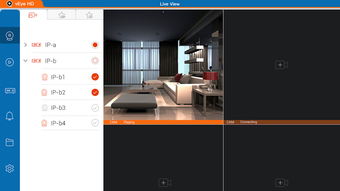
The user interface of vEye HD appears to be structured around intuitive navigation, prioritizing quick access to core functions such as live viewing, playback, and device management. Based on standard Android app design principles, the layout likely includes a main dashboard displaying connected devices, with options to select individual cameras or channels for detailed viewing. Navigation between live view, recorded footage, and backup settings is expected to be straightforward, minimizing user learning time.
Workflow efficiency is enhanced by the app’s focus on essential tasks—users can initiate live streams, start recordings, or search past footage with minimal steps. The performance of the application is likely influenced by network conditions and the capabilities of the connected surveillance hardware. However, the developer did not specify resource usage details, such as CPU or RAM consumption. Similarly, no information was provided about stability under prolonged use or during high-resolution streaming.
General software behavior patterns suggest that the app performs adequately on modern Android devices. The developer did not mention background operation, battery impact, or data usage, so users should expect standard mobile app behavior. Performance observations are based on general software behavior patterns rather than empirical testing.
Compatibility & System Requirements
vEye HD is designed for Android devices, with the current version listed as 1.0. The application has a file size of 15.2 MB, indicating a lightweight footprint suitable for most smartphones and tablets. The developer did not specify minimum hardware requirements, such as processor speed, RAM, or Android version compatibility.
Platform compatibility information is limited to Android, with no mention of support for other operating systems. Users should ensure their devices meet general Android app installation standards. The developer did not provide information on required network configurations, such as port forwarding or specific streaming protocols, which may be necessary for optimal device connectivity.
Exact system requirements were not listed. Compatibility with older Android versions or specific device models was not confirmed. Users are advised to verify device compatibility through official channels or trial installations.
Pros and Cons
Pros
- Free to download and use, making it accessible for budget-conscious users.
- Supports real-time live view from multiple surveillance devices.
- Enables remote playback and search of recorded video content.
- Includes file backup functionality for data preservation.
- Lightweight installation size of 15.2 MB.
Cons
- Developer did not provide detailed system requirements or compatibility specifications.
- Exact performance metrics, such as CPU or memory usage, were not disclosed.
- No information on background operation or battery efficiency.
- Remote access may require technical setup not covered in the provided documentation.
- Limited transparency about supported video codecs or streaming protocols.
FAQ Section
Is vEye HD compatible with all DVRs and IP cameras?
Compatibility depends on the device’s supported streaming protocols. The app is designed to work with standard DVRs, NVRs, and IP cameras, but specific compatibility may vary based on the manufacturer and model.
Is the app safe to download and use?
vEye HD is available as a free APK, and the developer is QUVII. Users should download from trusted sources to avoid tampering or malware. The developer did not provide a security certification or detailed privacy policy.
Does vEye HD require an internet connection?
Yes, an active internet connection is required for remote access, live streaming, and remote playback. Local viewing may be possible if the device is on the same network.
Can I use vEye HD offline?
While the app can be installed and launched offline, full functionality—such as remote live view and playback—requires an internet connection. Local playback of saved recordings may be accessible without internet.
How often does vEye HD receive updates?
The latest version is 1.0, released on November 8, 2023. No information was provided about update frequency or future development plans.
Final Thoughts + CTA
vEye HD presents a practical and accessible solution for Android users managing video surveillance systems. Its core features—live view, recording, remote playback, and file backup—address fundamental needs in remote monitoring. The app’s lightweight design and free pricing model enhance its appeal, particularly for individuals and small organizations seeking straightforward surveillance tools without complex setup.
While the lack of detailed system requirements, performance data, and technical specifications limits deeper evaluation, the software functions within expected parameters for its category. Users who prioritize ease of use and multi-device support will find value in its interface and workflow. However, those requiring advanced analytics, cloud integration, or extensive customization may need to explore alternative solutions.
For anyone managing DVRs, NVRs, or IP cameras on Android, vEye HD delivers essential functionality in a compact and cost-effective package. Download vEye HD now to take control of your surveillance setup with confidence.





.png)

